
File setup in Adobe Photoshop
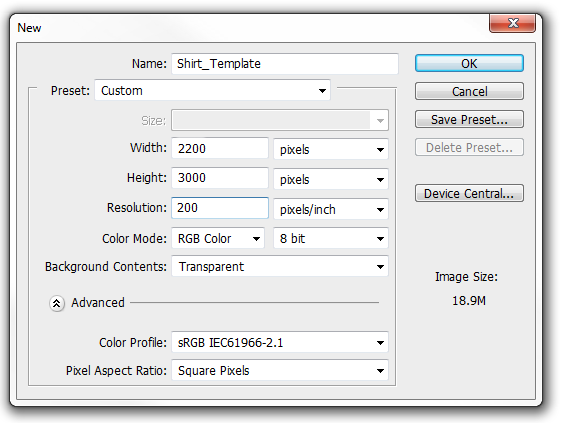
- Dimensions: 11″ × 15″ (2200 × 3000 pixels)
- Resolution: 200 dpi
- Background: Transparent
- Colour Mode: RGB 8-bit
- Colour Profile: sRGB
- Pixel Aspect Ratio: Square Pixels
- Export the final image as PNG with a transparent background
To save as PNG: File > Save As > File Format > PNG. Photoshop saves a copy automatically so transparent layers are preserved — click OK, then choose PNG Option > None.
Print-safe zone
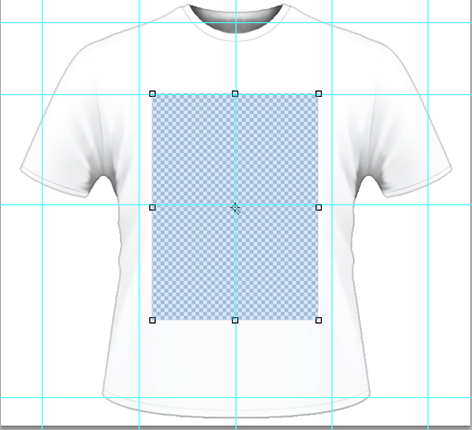
The print-safe zone is the area inside the 11″ × 15″ canvas where artwork will reliably print — using the setup from Step 1 as the reference. Prints start 1–3 inches below the collar depending on shirt size, so keep critical elements (faces, text, focal points) well inside the safe zone.
Print location
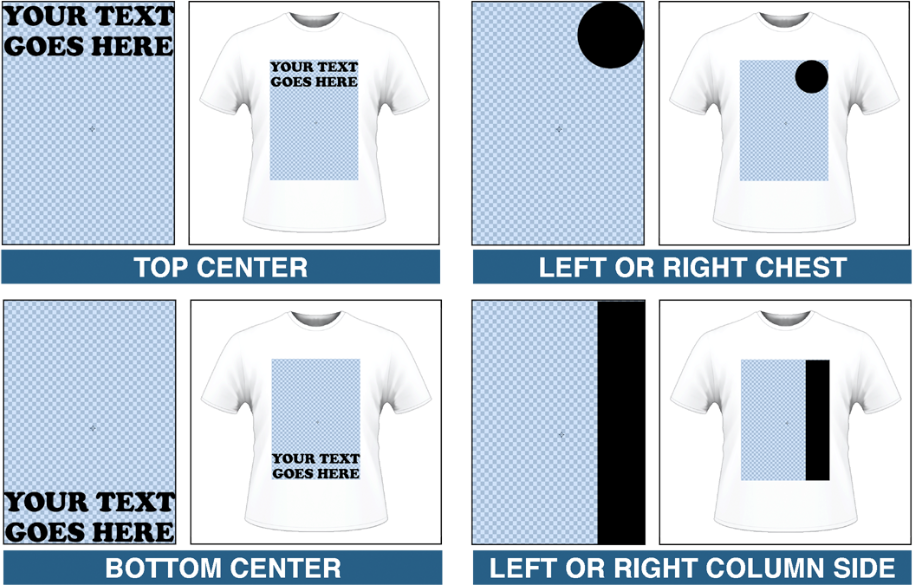
The diagram shows how artwork placed within the canvas translates to print position on the finished shirt. Use it as a quick reference when sizing and positioning your design before exporting.